Appearance > Use Dark Up Next Theme
-
I toggled “Use Dark Up Next Theme” on, but when I tap an episode on the Up Next page or tab, its Chapter tab’s background remains light. The episode link is https://pca.st/episode/52f64a4b-1dad-4e3c-80c3-85a38add5b50. The App version is 7.76 (9282) and the OS version is Android 13. The phone is currently in the light theme and I set the default light theme in the App and turned Use Android Light/Dark Mode on.
BTW, I recommend adding a dark mask to the artwork in the player after sunset to avoid glare on the bright artwork. Thanks for your time and consideration.
-
I toggled “Use Dark Up Next Theme” on, but when I tap an episode on the Up Next page or tab, its Chapter tab’s background remains light. The episode link is https://pca.st/episode/52f64a4b-1dad-4e3c-80c3-85a38add5b50.
I wasn’t able to reproduce this. It keeps the dark background for the said episode.
Would you mind letting us know the make and model of your device? Just wondering if this issue is device-specific.
If you can give some screenshots of how it looks, along with some screenshots of the app and phone settings that are related to theme setup on your device, that’d be helpful, too.
BTW, I recommend adding a dark mask to the artwork in the player after sunset to avoid glare on the bright artwork.
Thanks for the suggestion! We’ll note it down.
-
Thanks for taking the time to test. My phone is Meizu 17. If this problem isn’t common, you can just ignore it. Actually, it isn’t a big problem for me. I just found it by chance.
-
Hi @derekzhang98,
Your issue seems different from the original thread starter’s.
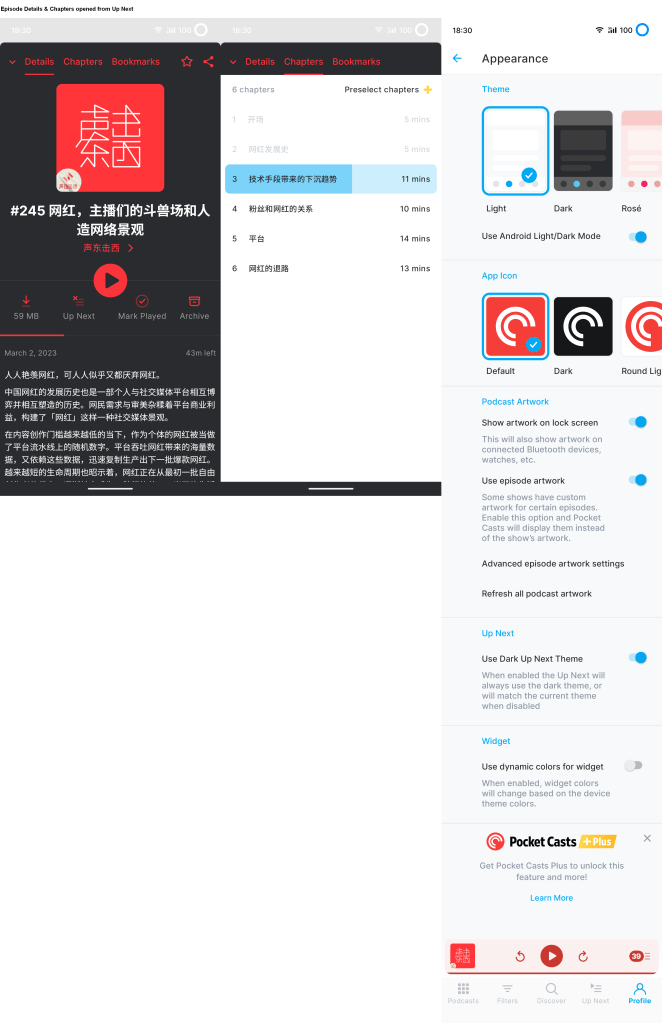
I see in the screenshot that the dark theme is not applied to the chapter list, which is different from Up Next.
Would you try selecting “Dark” under theme appearance and see if that helps with the background of the chapter? Since we can’t reproduce this issue on our end, we’re trying to see how the theme behaves on your phone.
-
Would you try selecting “Dark” under theme appearance and see if that helps with the background of the chapter?
When I choose the “Dark” theme under appearance settings, tapping an episode on the Up Next page correctly displays a dark background for its Chapter list. However, if I switch the theme to Light, Rose, or Indigo with “Use Dark Up Next Theme” enabled, the Chapter list’s background turns white instead of remaining dark as intended.
Your issue seems different from the original thread starter’s.
I see in the screenshot that the dark theme is not applied to the chapter list, which is different from Up Next.
Well, my understanding is that the “Use Dark Up Next Theme” option is designed to reduce the glare from the Up Next page during bedtime, without the need to enable the global dark theme. Typically, users access the Up Next page to select an episode and often check its chapters. Given that tapping an episode on the Up Next page results in dark background for Details and Bookmarks when this option enabled, it would be consistent to apply the dark theme to the chapter list as well. Hope I explained it clearly. Thanks for your time.
-
@derekzhang98 Thanks for clearly explain the issue. I managed to reproduce the issue after your additional notes. We have now reported this to our developers so they can address this.
Thanks again for your report!


 Pocket Casts Forum