Close buttons on the search screen of iPad is not working
-
Hi! I confirmed this bug a long time ago: this close button on the search screen of iPad version of the app is not working. Tapping this button does not clear the search history. The search is executed again.
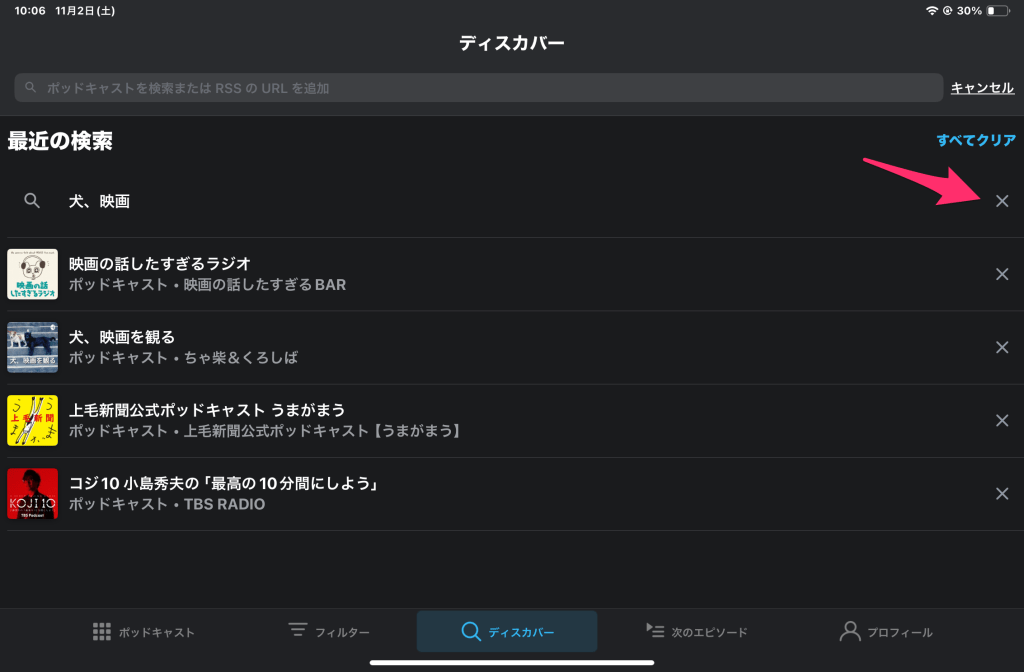
Incidentally, I use Pocket Casts latest version (7.74.1.0). And I use this App on iPadOS 18.1.
-
They do work, it’s just that they have very small touch targets, so you have to tap in the exact right spot. It is an annoying bug, but you can still remove an item from your search history if you keep tapping until you get the right spot.
-
I think I can’t do it. I use Pocket Casts for iPad for a few years. But I have never touch the right spot. So, please change this close buttons to big and easy to touch.
-
I’m not sure if this will help, but the most luck I get is when I put my finger (especially my pinkie) at a roughly 30–45º angle relative to the screen of my iPad and tap the x with the side of the tip of my finger.
https://drive.google.com/file/d/1uHOkPv_FIddd27EgmTRfyf42MALG5QzP/view?usp=drivesdk
-
-
Thank you for reporting the issue with the search screen close button on the iPad version of Day One.
We’ve shared your feedback with our design and development teams. They’re currently exploring ways to improve the search experience and address the issue with the close button.
-
The touch targets are much easier for me to tap now (I’m on version 7.91 of the app). Is the issue still occurring for you, @inventive113c787b56?
-
Thank you for replying and support. But after I updated to 7.91, I can’t delete these still. 😭
-
Sorry. I mistake. I logged in by other email account.
Thank you for replying and support. But after I updated to 7.91, I can’t delete these still. 😭
-
-
@inventive113c787b56 I just wanted to let you know that we released a fix for your issue with version 7.92. Can you let us know if that is working well for you?
-
Thank you for supporting! I updated Pocket Casts to ver.7.92. But I still can’t delete these serch historys by close button. The situation has not changed from previous versions.😢
I did clean install. And I thougt the reason of this bug is OS language setting, I changed OS language from Japanese to English. But the situation has not changed.
You can delete it by the close button without any problem in your environment, right? So I have given up on this problem being solved. Very thanks for working on the problem so far. Please work on other issues.
-
Thanks for confirming this with us, @inventive113c787b56
Our iOS team is taking another look into the issue and will look into making some additional changes. Can you confirm what iPad you are using to help us with replicating the issue?
-
Thank you for repling. I use iPad Mini 6th generation. iPadOS 18.5.
And I used iPad Air 4th generation a few years ago. This problem happened on iPad Air, too.
-
Hi there, @inventive113c787b56! Thanks for the device info. Our team is still working on this one. In the meantime, could you share if you’re using the Apple Pencil or other stylus to tap, or only fingers? Thank you! I found tapping with Apple Pencil is working for me so I wanted to check if you saw the same.


 Pocket Casts Forum