Feature Request: Undo Seek
-
I’m requesting a new feature called “Undo Seek” that would appear on the screen for approximately 10 seconds after the user performs a significant seek action. Tapping “Undo Seek” would return to the moment before the seek occurred.
Sometimes I accidentally drag my finger over the playback bar and inadvertently scrub to a different section of the podcast. Then I have to spend a few minutes skipping forward and backward trying to find where I was just listening. Instead, I’d love to simply tap “Undo Seek” to go back to where I was before that happened.
Similarly, sometimes I get tap-happy when skipping advertisements and skip way too far ahead. Pressing “Undo Seek” would bring me back to where I was and I can try again.
-
This button should also be available after jumping to another chapter in a podcast, as well.
The actual button doesn’t necessarily have to say “Undo Seek” and could be whatever is most intuitive. “Go back” or “Return to previous position” or “Undo skip” etc.
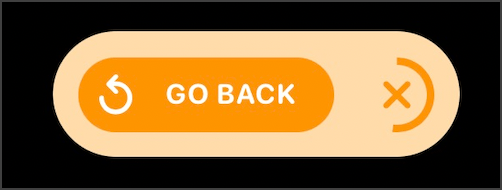
This idea comes from Marco Arment’s latest Overcast version that includes the feature. I think it’s an excellent idea and something that all podcast players should offer. His implementation appears as a “pill” that auto-dismisses and shows an animation as part of the dismiss button. Screenshot:
-
Thanks for the suggestion!
I’ve put your request on our feature list, and it might be included in a future release. Our developers consider each feature for every release, depending on how many requests we get for it. The more Pocket Casts users ask for this feature, the likelier it is to be built.
-
+1
I’ve also been burned by iOS’s latest Lock Screen media control (where the entire progress bar is a hit target) enough times that I’ve submitted feedback to Apple about it (FB14045174).
Since I doubt they’ll ever address it, the next best thing would be if Pocket Casts had “undo seek”. Please and thank you!! 🙏
-
Thank you for the idea and for adding context about what can cause accidental seeks! I’ve added your comment to our feature list tracking.
-
I have also had this problem – on the lockscreen, in the notification shade, and in the app itself.
Even if I notice I touched the seek bar before releasing, I can’t cancel it and I can’t see the current playhead position to get back to it easily. Some apps solve this by canceling the seek if you move your finger/cursor far enough away from the seek bar.
-
Thank you, @mallegonian, for sharing your idea on how to solve this problem. I’ve added your comment to our feature list tracking.
-
-
-


 Pocket Casts Forum