Multipe issues Android 7.67-rc-3 (9248) with download/playback/presentation
-
Longtime user (lifetime!) across multiple android devices across many years. I am experiencing a variety of issues that only started recently on my new phone (Motorola Edge 50 Fusion):
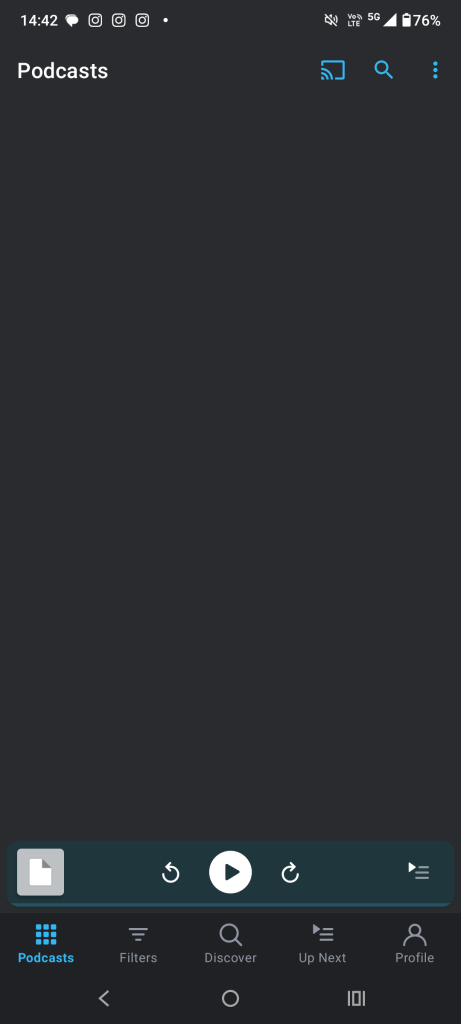
- Often, podcasts panel is completely blank – refresh doesn’t work, clearing app cache doesn’t work, logging in/out doesn’t work, reboot doesn’t work. Only solutions are either clear app data in android or reinstall app. Very frustrating.
- Files panel often doesn’t work. Doesn’t refresh or link with what reflects accurately on webplayer (google chrome). If it doesn’t downloads have scant chance of working, upload to cloud has been unreliable. Have attempted all troubleshooting options outlined in item 1 to no avail.
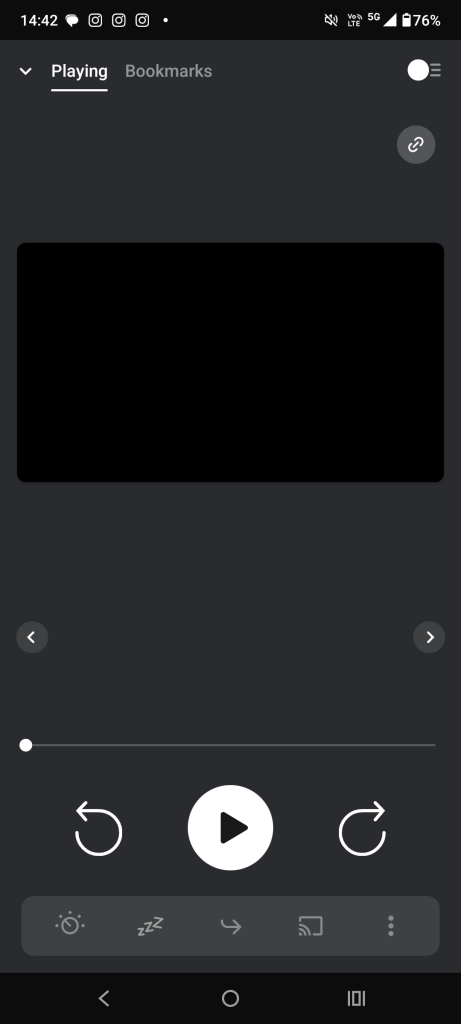
- Sometimes the playback panel is almost blank, with the exception of play/pause and forward and back buttons. No artwork, title, or any text whatsoever. Unpredictable when this will occur. Have attempted all troubleshooting options outlined in item 1 to no avail.
- Downloads, whether manual or automatic, will often not actually download. I have used a bandwith meter app (glasswire) to check this and there is no bandwidth going through the application. Does not matter if wifi or cellular, i have checked and unchecked the warn before mobile data switch and every other setting related to bandwidth. Have attempted all troubleshooting options outlined in item 1 to no avail.
I am falling out of love with this app that I have used for many years due to these issues! If anybody has any suggested fixes, please let me know. Let me know what other information you might need from me.
-
-
@haydenmitt11c7e6e8a5 thanks for flagging this with us.
Did you use a migration tool to transfer your apps to your new device?
If so, I wonder if something didn’t migrate your data through correctly. A good idea would be to uninstall Pocket Casts and reinstall it. After that, let us know if the issues persist.
Note: reinstalling will cause you to lose your downloads and custom settings in the app.
-
Sorry I can’t help, @haydenmitt11c7e6e8a5, but I can let you know you’re not alone. For the past 10 to 14 days or so I’ve suffered most of the same issues (exception being Files, which I don’t use), and in my case these problems happen on the same devices I’ve used with Pocket Casts all along. I have not migrated devices.
Your issue #3, the mostly-blank player, I encounter almost daily now on an HMD Nokia 7.2 phone. Once it occurs, the only “fix” I’ve found is force close, clear cache, clear storage, uninstall, reboot, reinstall, redo all settings.
Your issue #1, the blank podcasts panel, I get on both that Nokia 7.2 phone and a NVIDIA SHIELD Tablet K1. And on both, as you’ve found, the only “fix” seems to be that same “nuke it from orbit” and start again procedure.
Your issue #4, downloads that don’t, I keep running into on the NVIDIA SHIELD Tablet K1. While downloads are “stuck”, have you tried to refresh your account? I find that while downloads aren’t downloading, account refreshes also hang. “Refreshing…” displays forever, while the top of the Profile page shows the “Set up account” button instead of my account image and email address. Meanwhile, and perhaps unsurprisingly, reordering episodes in Up Next doesn’t save. Leaving the Up Next page and returning to it reveals Pocket Casts has reverted the changes. I’m curious if the same is true on your phone. Anyway, each time I must nuke and begin again.
Since the time these problems began, and outside of just the times downloads are stuck, I’ve also found synchronization across devices has become unreliable. In addition to the Nokia 7.2 and the SHIELD Tablet, I also use Pocket Casts on a Lenovo Chromebook Duet. Synchronization of Up Next, subscriptions, etc. used to work smoothly across the three devices. Pretty much every day now though, either the Nokia phone, the Nvidia tablet, or both choose to fork their own, private Up Next, even when Pocket Casts on that device indicates it is successfully refreshing. Only Pocket Casts on the Chromebook tablet seems immune. More nuking the app on the problem device and beginning again.
Pocket Casts has become a fair amount of work.
-
These are the devices and versions I have been using:
- HMD Nokia 7.2 (TA-1178), Android 11, Pocket Casts 7.67 (9249)
- Lenovo Chromebook Duet (Kukui), ChromeOS 126.0.6478.132, Android 11, Pocket Casts 7.67 (9249)
- NVIDIA SHIELD Tablet K1, Android 7, Pocket Casts 7.67 (9249)
And just yesterday I added Pocket Casts 7.67 (7.67.0.3) on an Apple iPad Air 2, iPadOS 15.8 (19H370), to the mix to see how the app behaves off-Android. So far, so good.
-
I am also having these issues on my Android phone where I have been using Pocket Casts daily for years. All of a sudden I am not able to play, delete or move podcasts in my queue. Is this a known issue that is currently being worked on because I’d rather not uninstall the application and lose my place if it is a temporary issue.
Thank you!
-
@haydenmitt11c7e6e8a5, we’ve since released version 7.68-rc-1, could you let us know if you’re still experiencing the issue with that update?
@sjgadsby, if you’re note already using the beta version of the app, you can opt-in to the beta updates from our Google Play Store page. Could you also update to 7.68-rc-1 to see if that resolves the issues for you?
@tlpc666522eee49, please share with us the version of Pocket Casts you are using on your end too? You can get that via Profile > Settings > About.
-
I have had these same issues in the android release of 7.67. The 7.68 release candidate did not fix them.
I have not yet un-installed and reinstalled the app. I’m hoping that some release candidate solves it so that I don’t need to redownload over 5000 episodes I have on my device now. Please let us know if you find the cause and whether it is recoverable without such a reset.
-
I uninstalled and reinstalled on my Android. It is Version 7.67 (9249). I am still having the same issues. The web version seems to be working.
-
Hi @tlpc666522eee49, I can confirm that our team is currently investigating this issue. We will provide updates as soon as we have more information.
-
For what it is worth: the Android app had failed to load content for me completely for multiple days. I started to use the app on an iPad for a bit.
To my surprise and delight, the Android version of 7.68-rc-1 (9250) just loaded successfully for the first time in quite a while and seems to be working for this “session.” I do not know if this is an intermittent problem (given comments above on “often” or “almost daily” above), whether I just wasn’t patient enough after my 7.68 upgrade, whether working through my queue on the iPad helped clear something out somehow, or something else.
Fingers crossed….
-
To my surprise and delight, the Android version of 7.68-rc-1 (9250) just loaded successfully for the first time in quite a while and seems to be working for this “session.” I do not know if this is an intermittent problem (given comments above on “often” or “almost daily” above), whether I just wasn’t patient enough after my 7.68 upgrade, whether working through my queue on the iPad helped clear something out somehow, or something else.
I’m glad to hear it’s working for you now! Please let us know if you run into any issues with it going forward!
-
Opting in to the beta and upgrading to 7.68-rc-1 (9250) did the trick.
After upgrading to the beta version on all my Android devices, Pocket Casts did misbehave the first time I launched it on each of two devices: the HMD Nokia 7.2 and the NVIDIA SHIELD Tablet K1.
- On the Nokia phone, the app stopped displaying items on the Podcasts and the Up Next tabs, but force stopping and relaunching the app fixed it.
- On the NVIDIA tablet, the app became stuck refreshing and then stopped responding to taps on play/pause, skip forward, and skip back. Restarting the tablet fixed it.
Both were easy fixes, and since then all has been well. My thanks to you, @mikerockwell, and the Pocket Casts devs!
-
Yup….I, too, eventually encountered the stuck display and unresponsive control buttons on Android with 7.68-rc-1 (9250). The force stop/relaunch worked. Tgat seems like it is an OK workaround. But: I had previously had a mucher higher degree of reliability from this app, so I hope that more troubleshooting might squash it completely.
-
Yes, I also got a stuck display and responsive buttons on Android 7.68-rc-1 (9250). Force shutting and reviving works as a workaround, but I’m hoping for a real solution soon. Null Brawl
-
@chiefa9f0f8046b It’s important to remember that beta versions are pre-release versions intended for testing purposes. They may contain bugs or unexpected behaviors that are not present in the stable release.
We’re actively working to resolve these issues and ensure a smooth experience in the upcoming stable release. Our goal is to provide a stable and polished version that addresses any known bugs or performance issues.




 Pocket Casts Forum