Data usage
-
Hi. I have just noticed pocket casts has used all of my data. Is there anything you can do to help.
-
Hi there, @jono258!
In a case like this, it would be worth checking on the following:
- Do you have auto-download enabled on your podcasts or Filters?
- Are you connected to WiFi or Mobile data when listening to your podcasts?
Checking on that should help determine why your data is being used up. In terms of ‘Auto-Downloads’, you can go to Settings > Auto-Downloads and set it to only download over WiFi if you find that this is enabled on your device.
Let us know what you find out!
-
Hi, thanks for the replies. No to auto download, and was connected to wifi, or so I thought. Looking at my mobile plan I used 58.8gb of data at 01.33am and 63.25 gb in whole of July, compared to 41.38mbs in June. i have switched off the allow background data option now, but little too late as I only had a 140gb for the year and now have 0 until December.
-
Hi @jono258 👋
Sure. Please monitor your data usage and let us know if the issue happens again.
Just note that if you disabled the Background Refresh option, the app might only be able to check for new episodes when you open it. I recommend enabling the “Warn before using data” option instead, so you get a notification whenever the app was trying to use mobile data for downloads or streaming.
-
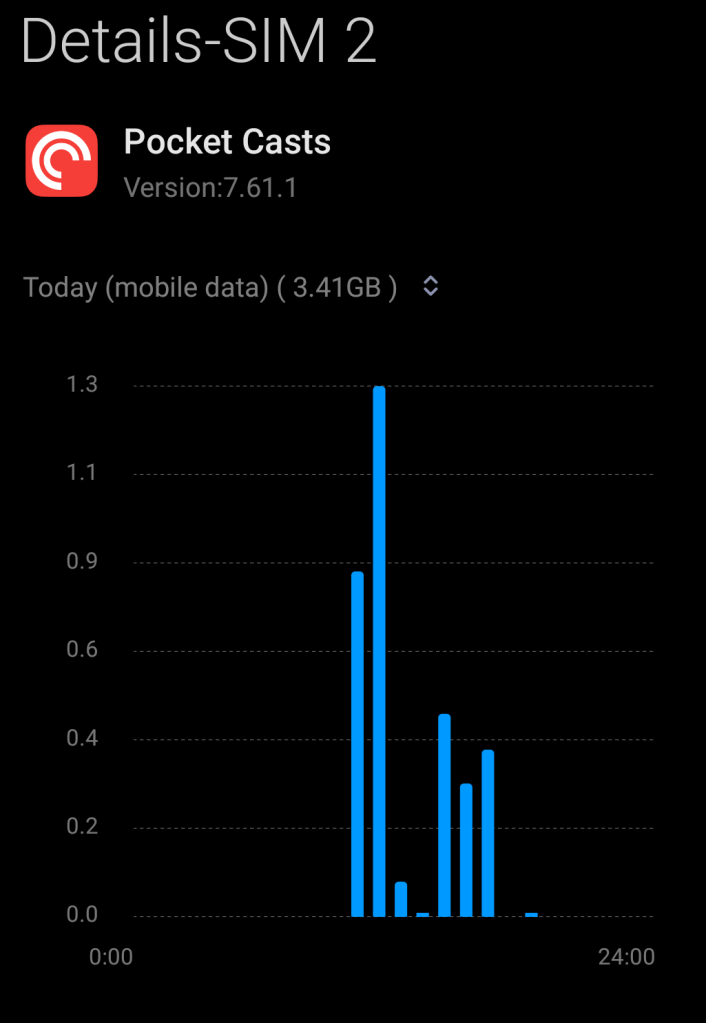
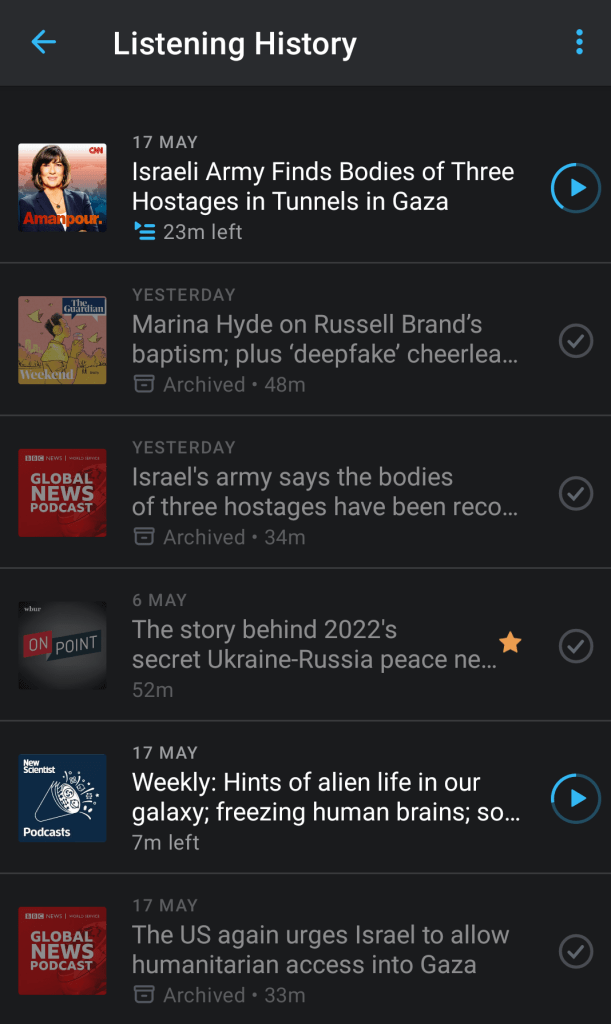
I had a similar experience recently so I can empathise. I was listening with headphones on. Usually when I pause/switch off the headset the podcast player pauses. Well it didn’t or I may accidentally have pressed play and it played for another 20 or 30 minutes. No big deal except that I got a data warning from my provider and before ai knew it 3.2 GB data was used up, far more than the cumulative size of the 4 or 5 podcasts I played that day. I’ve included a screen grab from my listening history and data use for my phone settings.
The episodes shown only amount to between 200 and 250 MB so it’s a mystery to me what the data was used for. Likewise I’ve turned off background processes till I better understand what happened.
-
@leopassi Can you check if you have any auto-download settings enabled under Profile > Settings (gear icon) > Auto download?
In addition, are the following enabled?
- Profile > Settings (gear icon) > Auto download > Only on unmetered WiFi/Only On WiFi
- Profile > Settings (gear icon) > Storage & data use > Warn before using data
-
@staff-cara Hello. I had not enabled auto-downloads but I had enabled the auto-play function. The app had auto-played the next episode in my feed before I realised it.
I have now activated data warning before streaming episodes as an extra safe-guard. I still cannot account for the extra data use but I am now wiser for it!
-
@leopassi Yes, the “Warn before using data” setting should act as an extra precaution, so it’s good that you enabled it! If you haven’t already, you can also turn Autoplay off from Profile > Settings (gear icon) > General. That can help us narrow down the cause of the extra data use if it continues.
-
The warning isn’t really helping. My auto d/l is off, warning is on. I dismissed a warning to listen to a podcast to and from work, maybe 10 minutes each way, and it used up 500mb. The full, hour long episodes were about 100mb. There’s something else happening here that’s pushing me over my data usage every month. Is there anything else that could be syncing while streaming?
-
Hi @boitedesix,
Pocket Casts will use a minimal amount of mobile data for the following tasks:
- Syncing
- Checking for new episodes
- Opening episode notes
- Manually refreshing podcast artwork
Enabling Use Mobile Data to auto-download episodes may incur significant mobile data fees and is not recommended.
For more information, you can check the Cell or Mobile Data page.
-
But I’m saying I don’t have auto download on. I got a warning about streaming a single episode and then suddenly it had chewed through 500mb?
-
Thanks for the clarification, @boitedesix.
Depending on what types of podcasts you’re subscribed to, or what settings you have enabled on Pocket Casts, the data usage will vary.
For example:
- Do you have trim silence enabled? If so, we will download in the background the current playing episode in order to apply the effect.
- Are you subscribed to Video podcasts? Running video podcasts can eat into your data usage.
I hope that helps!
-
whatever it’s is, i turned off all background data and auto downloading also warnings, its still consuming a ton of data, there is no more trouble shooting, I’ve done my best
-
@heartswiftly6591c87d43 thanks for giving all of those steps a try! It’s hard for us to pinpoint the cause of this without more specifics. Can you let us know:
- Your Pocket Casts version
- Your phone model and OS
- Names of some of the podcasts you are listening to
- Whether you always stream or download them
- What kind of data usage are you seeing?
-
@staff-joey8
pocket casts: 7.78
phone: redmi note 10 (miui 14.0.5)
the Ichiraku Podcast, the spawn chunks
the data usage is more the actual episode to download
-
@heartswiftly6591c87d43 thank you so much!
Just some extra clarification is needed here, so our team can advise further.When you say “i turned off all background data” – how exactly did you do so? In your Android Settings?
Additionally, do you recall when this first started happening? Did it start happening recently or has it been an issue for a while?
-
actually it’s happening from the past month, i turned off the background data in settings>apps>manage apps> pocket casts>data usage>background data(off)
-
-
@heartswiftly6591c87d43 we may need to dig into app logs to investigate this further. If you’re still seeing this behavior, could you reach out to us through the app by navigating to Profile > Help & Feedback > Get in touch?
You may receive an automatic response, but you can reply to that email to reach our support team directly.
In your message, you can also add a link to this forum thread — https://forums.pocketcasts.com/forums/topic/data-usage/?view=all#post-7294 — so we have a bit more context. :)


 Pocket Casts Forum